
myRAMS Security
Your security is important to us
If you believe your myRAMS Internet security has been breached or is at risk, or you have lost your mobile with myRAMS mobile enabled, please contact RAMS immediately on 13 7267.
Learn more about security and ways to protect yourself online below.
-
Change password

-
Activity history

-
SMS Security

-
Identity theft checklist

-
Protect yourself

Change My Password
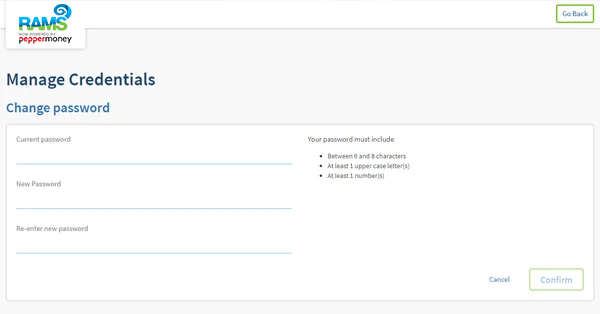
To keep your information secure, we recommend that you update your password regularly so that it makes life difficult for would-be attackers or fraudsters.
Change your password by selecting 'Your name" from the top right navigation. Select 'Manage credentials' and click on 'Update your password'.
Activity history
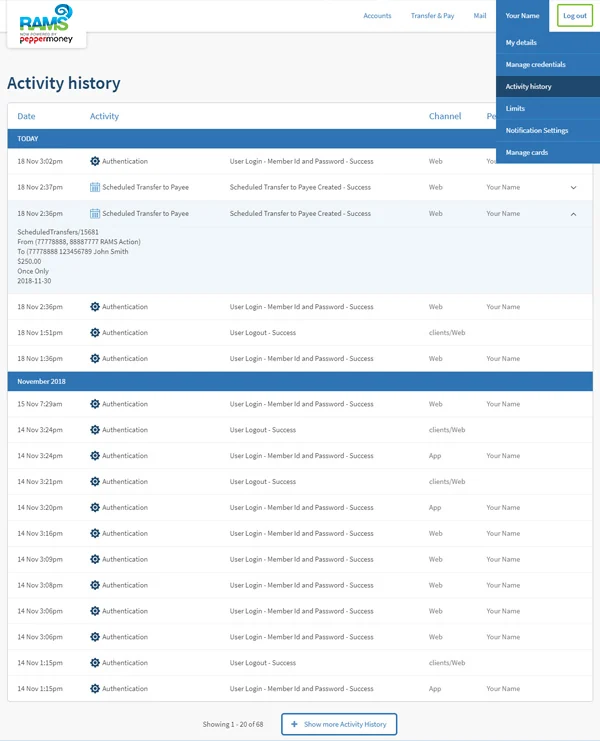
To view your activity history click on your name in the menu and click on ‘Activity history’ sub menu
This will show you all your myRAMS activity history including Authentication, Move money, Scheduled Move money.
®Registered to BPAY Pty Ltd ABN 69 079 137 518
SMS Security
With myRAMS, SMS Security is mandatory to make certain changes including:
- Personal details
- Your password
- Make BPAY® payments
- Make transfers (except to own accounts); and
- Pay anyone including new billers and payees.
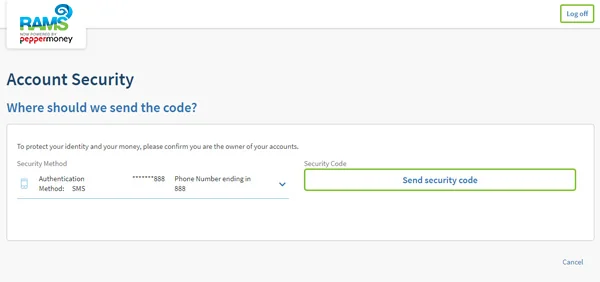
If you've already registered for SMS security, your mobile number should appear on the SMS Security page.
To register for SMS Security, please call us on 13 RAMS that's 13 7267.
Identity theft checklist
Identity theft is on the increase in Australia. It can take many forms, from your entire identity being used to open accounts, obtain loans, and conduct other illegal activities.
Here are some simple strategies to help protect your financial identity:
- Ensure your mailbox is locked and check it for tampering. If you'll be away from home for an extended period, arrange for mail to be held at your local post office or have a friend collect it
- Safely dispose of personal and financial information such as account statements, bills and receipts, by tearing or shredding them before throwing them away
- Sign up to electronic statements, which can be viewed and downloaded online: eStatements are also good for the environment
- Check you've received all expected bills and statements as a missing statement could mean a thief has removed it from your mailbox
- If you are registered for myRAMS, register for SMS Security which send SMS alerts to your mobile to authorise certain myRAMS transactions
- If you are registered by myRAMS, register for SMS Notifications, which sends SMS alerts to your mobile when myRAMS transactions nominated by you occur
- If you are moving house update your details straight away: Call us on 13 RAMS that’s 13 7267 7.00am-11.00pm (AEST) 7 days
- Do we have your mobile or telephone number? Knowing your current contact details will enable us to contact you quickly if suspicious activity is detected
How to protect yourself
Protect your computer
- Install security software
- Turn on automatic updates for all your security software
- Avoid using public computers as they may have a keystroke logger installed that captures password, credit card and bank account details.
- Set strong passwords and change them regularly
- Examine your browser settings, particularly the security settings. Select options that meet your needs without putting you at increased risk. If in doubt set the security levels to “high”.
Protect yourself
SMS Security code uses your mobile phone to confirm certain transactions via text message when transacting using myRAMS. It's quick, simple and provides you with increased security, free of charge.
- Identify and delete hoax emails
- Delete SPAM - don't open emails from a source you don't trust. Even better, check if your Internet service provider offers a spam filtering service
- Phishing filter - the latest browsers offer a built-in filter that scans web pages you visit for characteristics associated with known online web fraud or phishing scams, and warns you that such sites might be suspicious
- Always access www.rams.com.au by typing the address into your browser, checking that you're connected to a legitimate RAMS website. And always select "log out" from the myRAMS menu when you’ve finished.
- Protect your identity: never provide your personal or security details, including customer ID or passwords, in response to any email, even if it looks legitimate.
- Confirm that your data is encrypted: by ensuring a symbol of a lock appears within the browser
- Check your last sign-in date and time (at the top of the screen) whenever you sign into myRAMS to make sure it appears correct
- Regularly check statements for any transactions that look suspicious.
Protect your family
- Create different user accounts - admin access for parents, and restricted accounts for children
- Block inappropriate content with an Internet content filter
- Visit Australian Cyber Security Centre, a Government cyber security website designed to help understand security risks and educate users on simple steps to protect personal and financial information online.
Protect your business
- Keep data safe: implementing a regular backup procedure is a simple way to safeguard critical business data. Setting permissions and using encryption will also help.
- Set rules for Internet usage at work - unscrupulous web sites, as well as pop-ups and animations, can be dangerous. Set rules about Internet usage to protect your business and your employees.
- Remote access may be a business necessity, but it is also a security risk you need to closely monitor. Use strong passwords and be especially cautious about wireless networks.
- Protect your website with a controlled 3rd party 'ethical hack', which can help assess and mitigate the risks for Internet security, independent of any vendor or supplier.
Software protection
Updating your operating system on a regular basis is the first line of defence in keeping your computer secure. Updates (see if they can be automated) help prevent data loss, viruses and other potential risks. Microsoft Windows and Apple Mac OS are the most common operating systems.
3rd party security software could be considered. The links below are provided for convenience and do not represent endorsement by RAMS.
Online virus scanners
Security software
Important Information
Pepper Money Limited ABN 55 094 317 665 AFSL and Australian Credit Licence 286655 is the servicer of home loans owned by Pepper Finance Corporation Limited ABN 51 094 317 647. For RAMS loans and RAMS deposit accounts closed on or before 31 July 2026: Westpac Banking Corporation ABN 33 007 457 141 AFSL and Australian credit licence 233714. Pepper Money Limited also services these accounts. Pepper Money Limited and its subsidiaries use the RAMS trademarks and brands under licence from RAMS Financial Group Pty Ltd.

